Skip to content

Chat 组件 - 自定义 Fetch
GenuiChat 组件支持自定义 fetch 函数,允许你完全自定义 HTTP 请求的实现方式。这对于需要集成第三方 SDK、添加认证、处理工具调用、实现自定义流式响应等场景非常有用。
参数说明
url: 请求地址options.method: HTTP 方法(通常为 'POST')options.headers: 请求头对象options.body: 请求体(JSON 字符串),包含messages、model、temperature、metadata(带有处理好的customComponents、customSnippets、customExamples、customActions信息)options.signal: AbortSignal,用于取消请求
返回值
必须返回 Response 对象或 Promise<Response>。响应需要符合 OpenAI 兼容的流式格式(SSE),或者返回标准的 JSON 响应。
使用场景
添加认证头
通过 customFetch prop 传递自定义的 fetch 函数:
vue
<template>
  <GenuiConfigProvider :materials="materials">
    <GenuiChat :url="url" model="deepseek-v3.2" :customFetch="customFetch" />
  </GenuiConfigProvider>
</template>

<script setup lang="ts">
import { materials } from '@opentiny/genui-sdk-materials-vue-opentiny-vue/materials';
import { GenuiConfigProvider, GenuiChat } from '@opentiny/genui-sdk-vue';
import type { CustomFetch } from '@opentiny/genui-sdk-vue';

const url = 'https://your-chat-backend/api';

const customFetch: CustomFetch = async (url, options) => {
  // 添加认证头
  const headers = {
    ...options.headers,
    'Authorization': `Bearer ${localStorage.getItem('authToken')}`,
  };

  const response = await fetch(url, {
    ...options,
    headers,
  });

  return response;
};
</script>
处理工具调用和多轮对话
使用 customFetch 可以实现工具调用(Function Calling)和多轮对话功能。下面通过一个完整的示例来演示如何实现。
1. 定义工具(Tools)
首先,我们需要定义可用的工具。每个工具包含两个部分:definition(工具定义,符合 OpenAI 工具格式)和 execute(执行函数)。
typescript
import OpenAI from 'openai';

/**
 * 计算两个数字的和的工具
 */
export const addTwoNumbersTool = {
  definition: {
    type: 'function' as const,
    function: {
      name: 'add_two_numbers',
      description:
        '计算两个数字的和。这是一个数学计算工具,用于将两个数字相加。调用时必须提供两个数字参数 a 和 b。示例:如果 a=5, b=3,则返回 8。',
      parameters: {
        type: 'object',
        properties: {
          a: {
            type: 'number',
            description: '第一个要相加的数字,必填,必须是数字类型。例如:5',
          },
          b: {
            type: 'number',
            description: '第二个要相加的数字,必填,必须是数字类型。例如:3',
          },
        },
        required: ['a', 'b'],
      },
    },
  },
  execute: async ({ a, b }: { a: number; b: number }) => {
    return a + b;
  },
};

/**
 * 所有可用的工具列表
 */
export const availableTools: Record<
  string,
  {
    definition: OpenAI.Chat.Completions.ChatCompletionTool;
    execute: (args: any) => Promise<any> | any;
  }
> = {
  add_two_numbers: addTwoNumbersTool,
};
2. 实现 CustomFetch 处理工具调用
接下来,我们实现 customFetch 函数来处理工具调用和多轮对话:
typescript
import OpenAI from 'openai';
import type { CustomFetch } from '@opentiny/genui-sdk-vue';
import { availableTools } from './tools';

/**
 * OpenAI SDK 配置
 */
export interface OpenAIConfig {
  apiKey: string;
  baseURL?: string;
  organization?: string;
}

/**
 * 执行工具调用
 */
async function executeToolCall(toolName: string, args: any): Promise<string> {
  const tool = availableTools[toolName];
  if (!tool) {
    throw new Error(`Tool ${toolName} not found`);
  }

  try {
    const result = await tool.execute(args);
    return typeof result === 'string' ? result : JSON.stringify(result);
  } catch (error) {
    return JSON.stringify({
      error: error instanceof Error ? error.message : 'Unknown error',
    });
  }
}

/**
 * 累积工具调用数据
 * 将流式返回的工具调用增量数据累积成完整的工具调用对象
 */
function accumulateToolCalls(toolCalls: any[], toolCallDeltas: any[]): void {
  for (const delta of toolCallDeltas) {
    const index = delta.index ?? 0;
    const toolCall = (toolCalls[index] ??= {
      id: delta.id ?? '',
      type: 'function',
      function: { name: '', arguments: '' },
    });
    if (delta.id) toolCall.id = delta.id;
    if (delta.function?.name) toolCall.function.name += delta.function.name;
    if (delta.function?.arguments) toolCall.function.arguments += delta.function.arguments;
  }
}

/**
 * 执行单个工具调用并返回结果
 */
async function executeSingleToolCall(toolCall: any, currentMessages: any[]): Promise<any> {
  const createResult = (result: string) => {
    currentMessages.push({ role: 'tool', tool_call_id: toolCall.id, content: result });
    return {
      id: toolCall.id,
      type: 'function',
      function: { name: toolCall.function.name, arguments: toolCall.function.arguments, result },
    };
  };
  try {
    const args = JSON.parse(toolCall.function.arguments);
    const result = await executeToolCall(toolCall.function.name, args);
    return createResult(result);
  } catch (error) {
    return createResult(JSON.stringify({ error: error instanceof Error ? error.message : 'Unknown error' }));
  }
}

/**
 * 使用 OpenAI SDK 创建 customRequest 函数(处理工具调用和多轮对话)
 *
 * @param config OpenAI 配置
 * @returns CustomFetch 函数
 */
export function createOpenAICustomFetch(config: OpenAIConfig): CustomFetch {
  return async (
    url: string,
    options: {
      method: string;
      headers: Record<string, string>;
      body: string;
      signal?: AbortSignal;
    },
  ): Promise<Response> => {
    // 解析请求体
    const requestBody = JSON.parse(options.body);
    const { messages, model, temperature } = requestBody;

    try {
      const openai = new OpenAI({
        apiKey: config.apiKey,
        baseURL: config.baseURL,
        dangerouslyAllowBrowser: true,
      });

      const tools = Object.values(availableTools).map((tool) => tool.definition);
      const maxSteps = 20; // 最大工具调用步骤数

      // 将流转换为 SSE 格式的 Response
      const encoder = new TextEncoder();
      const readableStream = new ReadableStream<Uint8Array>({
        async start(controller) {
          try {
            let currentMessages = [...messages];
            let stepCount = 0;

            while (stepCount < maxSteps) {
              // 创建流式请求
              const stream = await openai.chat.completions.create(
                {
                  model,
                  messages: currentMessages,
                  temperature,
                  tools: tools.length > 0 ? tools : undefined,
                  tool_choice: tools.length > 0 ? 'auto' : undefined,
                  stream: true,
                },
                {
                  signal: options.signal,
                },
              );

              let toolCalls: any[] = [];
              let hasToolCalls = false;

              // 处理流式响应
              for await (const chunk of stream) {
                const choice = chunk.choices?.[0];
                if (!choice) continue;

                const delta = choice.delta;

                // 累积工具调用数据
                if (delta.tool_calls) {
                  hasToolCalls = true;
                  accumulateToolCalls(toolCalls, delta.tool_calls);
                }

                // 透传原始 chunk
                controller.enqueue(encoder.encode(`data: ${JSON.stringify(chunk)}\n\n`));

                // 处理完成原因
                if (choice.finish_reason === 'tool_calls' && toolCalls.length > 0) {
                  // 执行工具调用
                  currentMessages.push({ role: 'assistant', content: null, tool_calls: toolCalls });
                  const toolResults = await Promise.all(
                    toolCalls.map((toolCall, i) =>
                      executeSingleToolCall(toolCall, currentMessages).then((result) => ({ ...result, index: i })),
                    ),
                  );

                  // 发送工具调用结果
                  if (toolResults.length > 0) {
                    const toolResultChunk = {
                      id: chunk.id,
                      object: 'chat.completion.chunk',
                      model: chunk.model || model,
                      created: chunk.created || Math.floor(Date.now() / 1000),
                      choices: [{ index: 0, delta: { tool_calls_result: toolResults }, finish_reason: 'tool_calls' }],
                    };
                    controller.enqueue(encoder.encode(`data: ${JSON.stringify(toolResultChunk)}\n\n`));
                  }

                  stepCount++;
                  break;
                }

                if (choice.finish_reason) {
                  // 正常完成,退出外层循环
                  break;
                }
              }

              // 如果没有工具调用,退出循环
              if (!hasToolCalls) {
                break;
              }
            }

            // 发送结束标记
            controller.enqueue(encoder.encode('data: [DONE]\n\n'));
            controller.close();
          } catch (error) {
            const errorData = {
              error: {
                message: error instanceof Error ? error.message : 'Unknown error',
                type: 'stream_error',
              },
            };
            controller.enqueue(encoder.encode(`data: ${JSON.stringify(errorData)}\n\n`));
            controller.error(error);
          }
        },
      });

      return new Response(readableStream, {
        headers: {
          'Content-Type': 'text/event-stream',
          'Cache-Control': 'no-cache',
          'Connection': 'keep-alive',
        },
        status: 200,
      });
    } catch (error: any) {
      console.error('[OpenAI SDK Error]', {
        url,
        error: error.message,
      });

      // 返回错误响应
      return new Response(
        JSON.stringify({
          error: {
            message: error.message,
            type: error.type || 'unknown',
            code: 500,
          },
        }),
        {
          status: 500,
          headers: {
            'Content-Type': 'application/json',
          },
        },
      );
    }
  };
}

/**
 * 默认的 customFetch 实现(使用环境变量配置)
 */
export const defaultCustomFetch = createOpenAICustomFetch({
  apiKey: import.meta.env.VITE_OPENAI_API_KEY,
  baseURL: 'https://your-chat-backend/api',
});
关键实现点:
- 多轮对话循环:使用
while循环处理多轮工具调用,最多执行maxSteps次 - 消息历史管理:维护
currentMessages数组,包含用户消息、助手消息和工具调用结果 - 工具调用处理:
- 当
finish_reason为tool_calls时,执行所有工具调用 - 将工具调用结果添加到
currentMessages中,继续下一轮对话
- 当
- 流式响应转换:将 OpenAI SDK 的流式响应转换为 SSE 格式,否则组件无法正常处理,
- 工具调用结果发送:通过
tool_calls_resultdelta 字段发送工具执行结果,让组件能够正确更新工具调用状态并显示调用结果。
3. 在应用中使用
最后,在 Vue 组件中使用自定义的 customFetch:
vue
<template>
  <GenuiConfigProvider :materials="materials">
    <div class="app-container">
      <GenuiChat :customFetch="defaultCustomFetch" model="deepseek-v3.2" :temperature="0.5" :chatConfig="chatConfig" />
    </div>
  </GenuiConfigProvider>
</template>

<script setup lang="ts">
import { materials } from '@opentiny/genui-sdk-materials-vue-opentiny-vue/materials';
import { GenuiConfigProvider, GenuiChat } from '@opentiny/genui-sdk-vue';
import { defaultCustomFetch } from './api/custom-fetch';

const chatConfig = {
  addToolCallContext: true,
  showThinkingResult: true,
};
</script>

<style scoped>
.app-container {
  width: 100%;
  height: 100vh;
  display: flex;
  flex-direction: column;
}
</style>
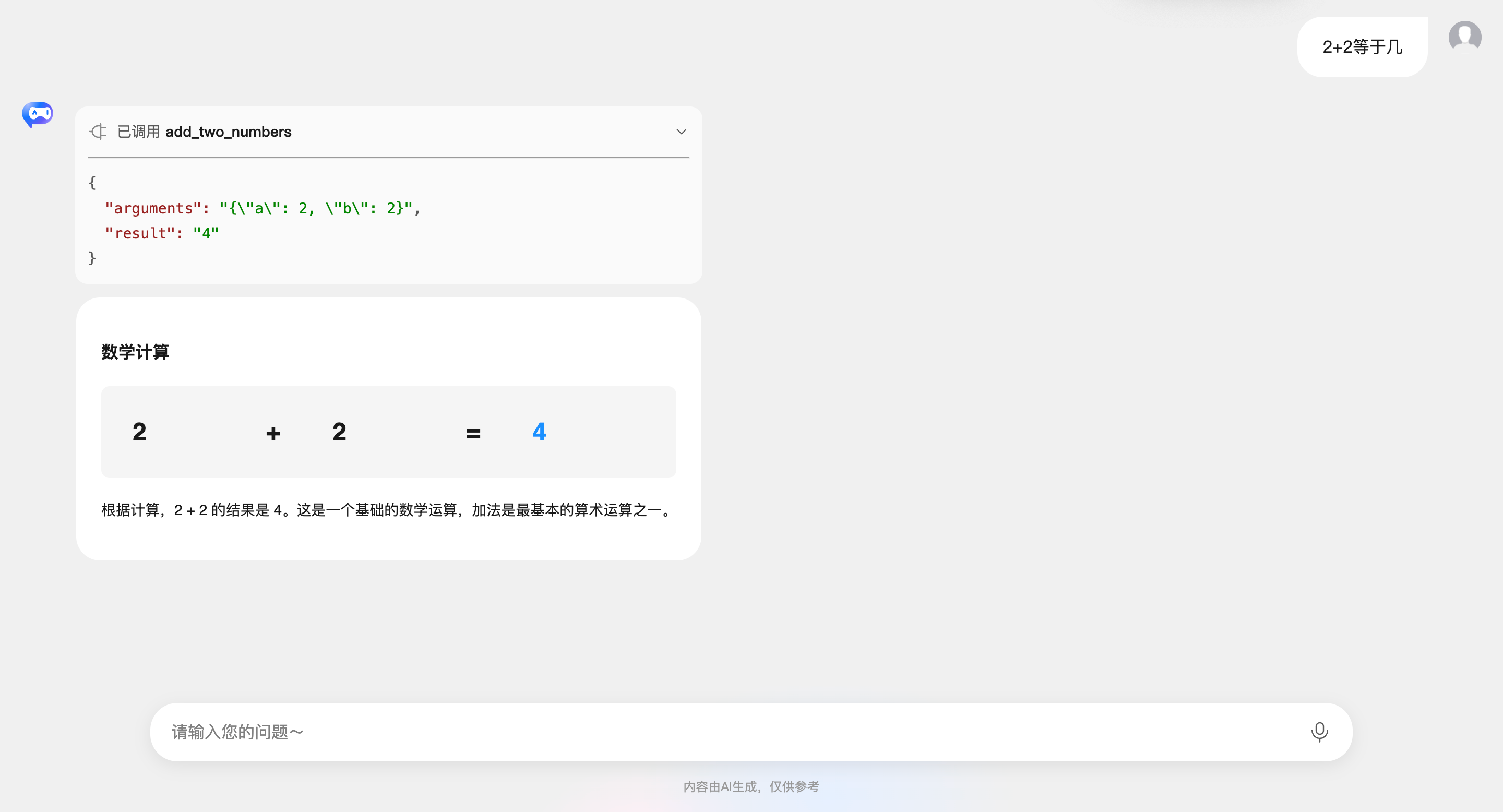
体验工具调用
完成以上步骤后,就可以体验工具调用了,能够在对话中查看工具调用参数和结果: